AI visibility report template
Use this template to turn manual AI answer checks into a report your team can act on. Track the prompt, engine, brand mention, competitors, sentiment, source evidence, target page, and next action in one place.
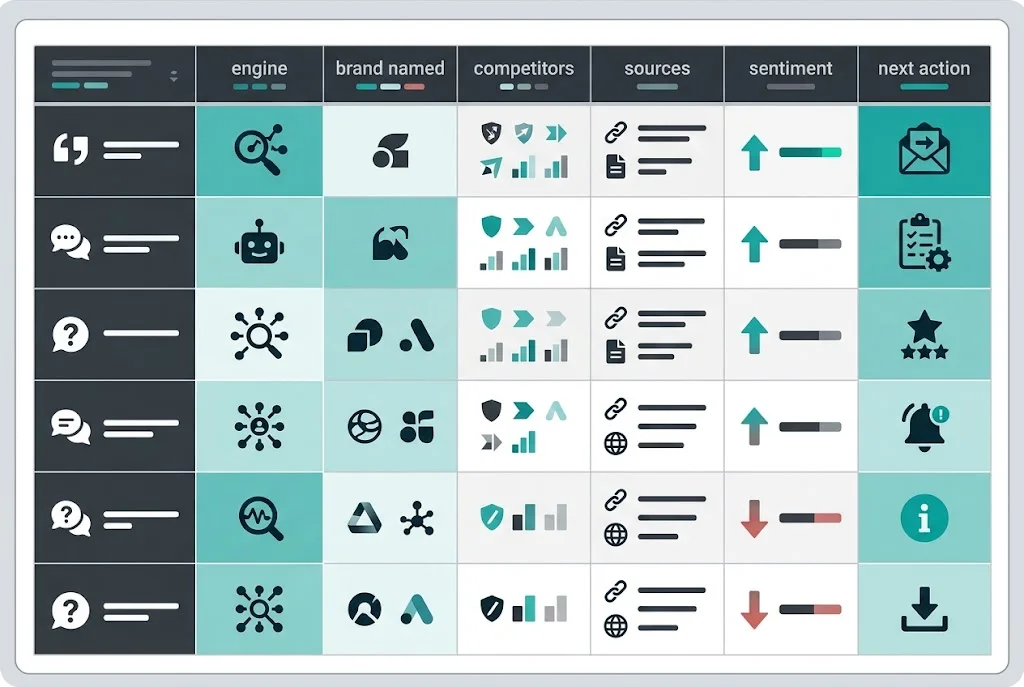
The report structure
An AI visibility report should prove what the answer engines said, not just summarize a score. The report should show which prompts were tested, which engines answered, whether your brand appeared, which competitors appeared instead, and what action follows.
Public reporting examples from teams like Semrush, Wellows, and My Web Audit all point to the same practical need: AI visibility reporting has to separate evidence, interpretation, and next steps.
We also map the template to primary source behavior. Google reports AI feature traffic in Search Console under Web search and says eligible pages need to be indexed and available as Search snippets. OpenAI and Perplexity both document separate crawler or user-agent behavior, so a useful report needs one column for the answer and another for the sources that appear to support it.
What to include
CSV columns
The CSV keeps the report simple enough for a first audit and strict enough to compare movement over time. Add more columns later only if they change a decision.
promptintentenginebrand_namedbrand_positionsentimentcompetitors_namedcited_sourcestarget_pagenext_actionownerstatusHow to use it
- Choose 10 buyer prompts. Include category, problem, comparison, alternative, and best-tool questions.
- Run the prompts across engines. Check at least ChatGPT, Gemini, Perplexity, and Google AI Mode. Add Claude and Copilot if they matter to your buyers.
- Record the answer, not your interpretation. Mark whether the brand was named, where it appeared, who else appeared, and which sources were cited.
- Assign one next action. Each gap should map to a page update, new page, third-party mention, directory profile, or source fix.
- Recheck the same prompts. Trend matters more than a single answer. Use the same prompts before changing the set.
Manual report vs monitoring software
A spreadsheet is the right first step if you have no baseline. It is cheap, transparent, and forces the team to understand the prompts. It is not enough once reporting becomes recurring. Manual checks drift by prompt wording, location, engine state, and reviewer judgment.
Sonarvue automates the recurring layer. It stores the prompt and answer, tracks presence, position, sentiment, competitors, citations, and share of voice across eight default engines, then turns each gap into a concrete action.
Related resources
Start with the AI visibility pillar, use the AI visibility optimization checklist, understand the AI visibility score, compare free AI visibility checkers, or evaluate AEO tracking software.
Frequently asked
What is an AI visibility report?
An AI visibility report shows whether answer engines name a brand for buyer prompts, which competitors are named instead, how the brand is described, which sources support the answer, and what should be fixed next.
What should an AI visibility report include?
It should include the prompt set, engines checked, brand presence, answer position, sentiment, competitor mentions, cited sources, target pages, next actions, owners, and status.
How often should you update an AI visibility report?
Monthly is enough for a first manual workflow. Weekly or daily reporting becomes useful once AI visibility is a channel metric or competitors are moving quickly.
Can I use a spreadsheet instead of AI visibility software?
Yes for a baseline or early audit. A spreadsheet breaks down when you need repeatable prompt runs, answer history, share of voice, alerts, and source movement across several engines.